How to Search Movies Fast: Find What to Watch Next (2026)

If you have ever opened Netflix with the best intentions and closed it forty minutes later with nothing playing, you already know the problem. This guide is about how to search movies fast: the habits, the tools, and the two-minute routine we use inside Cineswipe. No filler, no twenty-tab research session.
Choosing a movie should not eat the first twelve minutes of your evening. For the average US viewer, it does. Gracenote's 2025 State of Play report found that US viewers spend about 12 minutes per session working out what to watch, up from 10.5 minutes in 2023. Across six countries the average is 14 minutes, and in France it reaches 26.
TL;DR: how to find a movie fast
The fastest way to find a movie is to stop browsing and start narrowing: pick the service you will actually use, decide your mood and runtime before you open anything, look at one title at a time, and quit as soon as you have three candidates. A swipe-based app like Cineswipe turns that routine into about two minutes.
- How to search movies fast: search by a title you already love ("movies like X"), filter to the services you pay for, and cap yourself at three picks. Details are in the seven habits below.
- Best ways to find movies in 2026: mix one taste-based method (swipes, ratings, an AI assistant) with one availability method (a streaming guide) and one human method (a friend's recommendation).
- Best apps for movie recommendation: Cineswipe, JustWatch, Letterboxd, Trakt, Reelgood, Taste and MovieLens each solve a different half of the problem. We compare them honestly below.
- Fastest way to find what to watch next: swipe 10 to 15 titles, watch two clips, ask Cinebot one question, and press play.
- Share reviews with friends: rate a title in Cineswipe and turn the review into a shareable poster, or send friends a public Cinelist.
- Your cinephile profile: every rating, watch and swipe feeds a profile with stats, an activity timeline and a link you can share.
Why does it take so long to pick a movie?
Because there is far more to choose from than anyone can scan, and most apps are built to keep you browsing rather than to help you decide. Most advice about how to search movies fast starts with a better app, but the delay begins earlier: three separate problems stack up before you press play.
Gracenote's survey has two numbers that explain the mood on a Friday night. 19% of people give up on the viewing session when their search fails, and 49% say they would consider cancelling a service because they cannot find anything. We have all closed the app and gone to bed with the decision still unmade.
Here is the part nobody talks about. Just 6% of streaming titles accounted for more than 75% of viewing minutes in April 2025, according to Gracenote data reported by MediaVillage. We keep returning to what we already know because it is easy, not because it is best. And the home screens we browse are not neutral: Netflix researchers reported that its recommender system influences about 80% of the hours streamed on the service (Gomez-Uribe and Hunt, 2015). That is useful if your taste is mainstream and frustrating if you want something specific.
So three things go wrong at once:
- Too many options. Millions of titles, shown as rows of posters.
- No context. A grid does not know that tonight you want something light and under 100 minutes.
- Split availability. The film you want sits on a service you do not pay for.
Every fix in this guide goes after one of those three. If you want the longer argument, we wrote about it in The Future of Movie Discovery.
How to search movies fast: 7 habits that actually work
The answer to how to search movies fast is to settle your mood and runtime before you open anything, start from a film you already love, filter to the services you pay for, judge by a short clip instead of a synopsis, and stop at three candidates. Save everything else to a watchlist so tomorrow's search starts from your own list.
- Decide mood and runtime first. Two questions, five seconds: light or heavy tonight, and under or over 100 minutes? Much of the wasted time disappears here, because you stop reading posters that were never going to fit.
- Start from a film you love, not a genre. "Drama" is a bucket of ten thousand films. "Something like Arrival but warmer" is a query a good tool can answer. Type your favourite title into a similar-titles section, or say it to an assistant like Cinebot.
- Filter to the services you pay for. There is no point researching a film you cannot press play on. JustWatch and Reelgood let you pick your services, and so does Cineswipe in its preferences.
- Search by person and year. If one director or actor is the reason you are here, go to their page and read the filmography. In Cineswipe's search you can add a year filter like
y:2023after a title, which cuts a long list down fast. - Judge with 15 seconds of footage. A synopsis tells you the plot. A clip tells you the colour, the pacing and whether you will stay awake. The Clips feed in Cineswipe exists for exactly this.
- Cap the shortlist at three. Pick three, compare only those, and choose. If you are watching with someone, show them three, not thirty. The group chat debate gets shorter the moment the list does.
- Save as you go. Anything that catches your eye goes on a watchlist, even if you will not watch it tonight. Your own watchlist is the fastest movie search engine you will ever own, because it is already filtered by your taste.
A few habits that quietly cost you time: opening a streaming app with no plan, reading reviews for ten films instead of two, and asking "what should we watch?" in a group chat without a shortlist. Fix those three and you have already saved most of the twelve minutes. If genres are where you get stuck, our guide to movie genres and finding your taste helps you name what you actually like.
What are the best ways to find movies in 2026?
There are eight ways that work, and none of them wins alone. Streaming guides tell you where a film is. Taste-based tools tell you whether you will like it. Friends tell you whether it is worth your Saturday. The best movie discovery setup in 2026 combines one method from each group instead of hunting for a single perfect app.
| Method | Best for | Weak spot | Examples |
|---|---|---|---|
| Streaming home screens | Zero setup, mainstream picks | Tuned to keep you inside one catalog | Netflix, Prime Video, Disney+ |
| Streaming search engines | Finding where a known title streams | Does not learn your taste | JustWatch, Reelgood |
| Social film diaries | Trusted opinions, lists, reviews | Discovery depends on who you follow; some stats and filters are paid | Letterboxd |
| Rating-based taste matching | Recommendations from people with similar taste | Needs around 20 ratings before it is useful | Taste, MovieLens |
| History trackers | Recommendations from what you really watched | Setup effort; automatic logging is a paid feature | Trakt |
| AI assistants | Vague moods and constraints in plain language | Only as good as what it knows about you | Cinebot, general chatbots |
| Swipes and short clips | Fast, low-effort, learns from every choice | Needs a few sessions to learn you | Cineswipe |
| Friends and public lists | Trust, shared taste | Slow, and taste can mismatch | Cinelists, group chats |
If you only change one thing this week, add a taste-based method. Streaming guides are everywhere already, and they answer "where" far better than they answer "what". The gap most people have is in the middle: a tool that knows what they liked last month. That gap is why so many guides to how to search movies fast start and end with a streaming search engine, then leave you with the same eight posters you saw last Friday.
A practical stack that does not take effort: one streaming guide for availability, one swipe or rating tool for taste, and one friend whose picks you trust. That covers all three problems from the section above.

What are the best apps for movie recommendation in 2026?
The best movie recommendation apps in 2026 are Cineswipe for swipe-based discovery, JustWatch and Reelgood for finding where something streams, Letterboxd for opinions from people you trust, Trakt for automatic watch history, and Taste or MovieLens for recommendations built from your ratings. Each one solves a different part of the problem, so the right pick depends on which part annoys you most.
A note on fairness: we make Cineswipe, so it is first on the list and you should weigh that. We have described the others from their own listings and independent coverage, and we have said what each one does not do.
Cineswipe
Best for: deciding what to watch tonight, then keeping track of it.
You swipe through movies and shows one at a time, right to save and left to skip, and the app learns from every swipe. You can set genre filters with AND/OR logic, plus language, region and year. A Clips feed shows short trailers and snippets matched to your taste, and Cinebot, the built-in AI assistant, answers requests like "something light under 90 minutes." Cineswipe tracks movies and episodes, syncs with Trakt, Simkl and TMDB, and builds stats on your watching. It is free to download on iOS and Android; Pro adds cloud sync, unlimited Cinebot and a Chrome extension. The App Store listing shows Pro at $1.99 a month, $19.99 a year or $59.99 for lifetime, so check the store for current pricing.
What it is not: a streaming service. It points you to what to watch and tells you where, but you press play elsewhere. It is also a small team, built by one developer and one marketer, so expect fast iteration and the occasional rough edge.
JustWatch
Best for: "where is this streaming?"
JustWatch is a streaming search engine. You tell it which services you have, and it filters results to those, keeps a watchlist and lists what is new on your platforms. The free version is ad-supported, with a paid Pro tier that removes ads. It is built around availability rather than taste.
Letterboxd
Best for: reading opinions from people whose taste you trust.
Letterboxd is a social film diary: you log what you have watched, rate it, write reviews, build lists and follow friends to see what they are watching. Most of it is free, while extras like personal stats and streaming-service filters sit behind Letterboxd Pro. Discovery is only as good as your follow list.
Trakt
Best for: automatic watch history.
Trakt's standout feature is scrobbling, which logs what you watch across connected services without you ticking boxes. That feature is part of its paid VIP plan. Several users have complained about pricing and free-tier limits. It pairs well with Cineswipe, which syncs with it.
Reelgood
Best for: seeing everything across many services in one place.
Reelgood combines more than 150 streaming services into one guide, lets you track shows, and has a "Reelgood Roulette" button for when you cannot choose.
Taste
Best for: recommendations from people who share your taste.
Taste asks you to rate around 20 titles as awful, meh, good or amazing, then matches you with similar users and shows a match percentage on each film. It also uses a swipe-style interface and only shows titles on services you subscribe to. The upfront rating work is the price of entry.
MovieLens
Best for: non-commercial recommendations from your ratings.
MovieLens is a long-running research project from the GroupLens group at the University of Minnesota: rate movies, build a taste profile and get recommendations back. It needs your ratings before it can help.
Which one should you pick?
- You want to stop scrolling and pick something tonight: Cineswipe or Taste.
- You already know the title and need to find it: JustWatch or Reelgood.
- You want opinions and lists from real people: Letterboxd.
- You want your history logged for you: Trakt, ideally paired with Cineswipe.
What's the fastest way to find what to watch next?
The fastest way to find what to watch next is a three-minute routine: set your filters, swipe through 10 to 15 titles, watch two short clips, ask one specific question, and press play on the first title that survives. It works because you only ever look at one option at a time, and the app does the comparing for you. That routine is also the practical answer to how to search movies fast, because it removes every decision except the final one.
Here is the version we use ourselves in Cineswipe.
- Set your services once (30 seconds, one time). Add the streaming services you pay for in preferences, so everything you see is playable. You will not need to do this again.
- Set tonight's filter (15 seconds). Pick the genres, language and year range. The AND/OR switch matters: "comedy AND crime" gives you dark comedies, while "comedy OR crime" gives you everything in both piles.
- Swipe 10 to 15 titles (60 seconds). Right for "I would watch that," left for "not tonight." Do not deliberate. A swipe is a vote, and the pile of rights is your shortlist.
- Watch two clips (30 seconds). Open the Clips feed on your two strongest candidates. Fifteen seconds of footage settles most arguments between a poster and a plot summary.
- Ask Cinebot one question (30 seconds). If you are still torn, type something like "something funny under 100 minutes that isn't a rewatch." Cinebot is unlimited on Pro.
- Open the details page and press play. The page shows cast, ratings and where it is streaming. Pick the winner. Anything else you liked goes on your watchlist for next time.
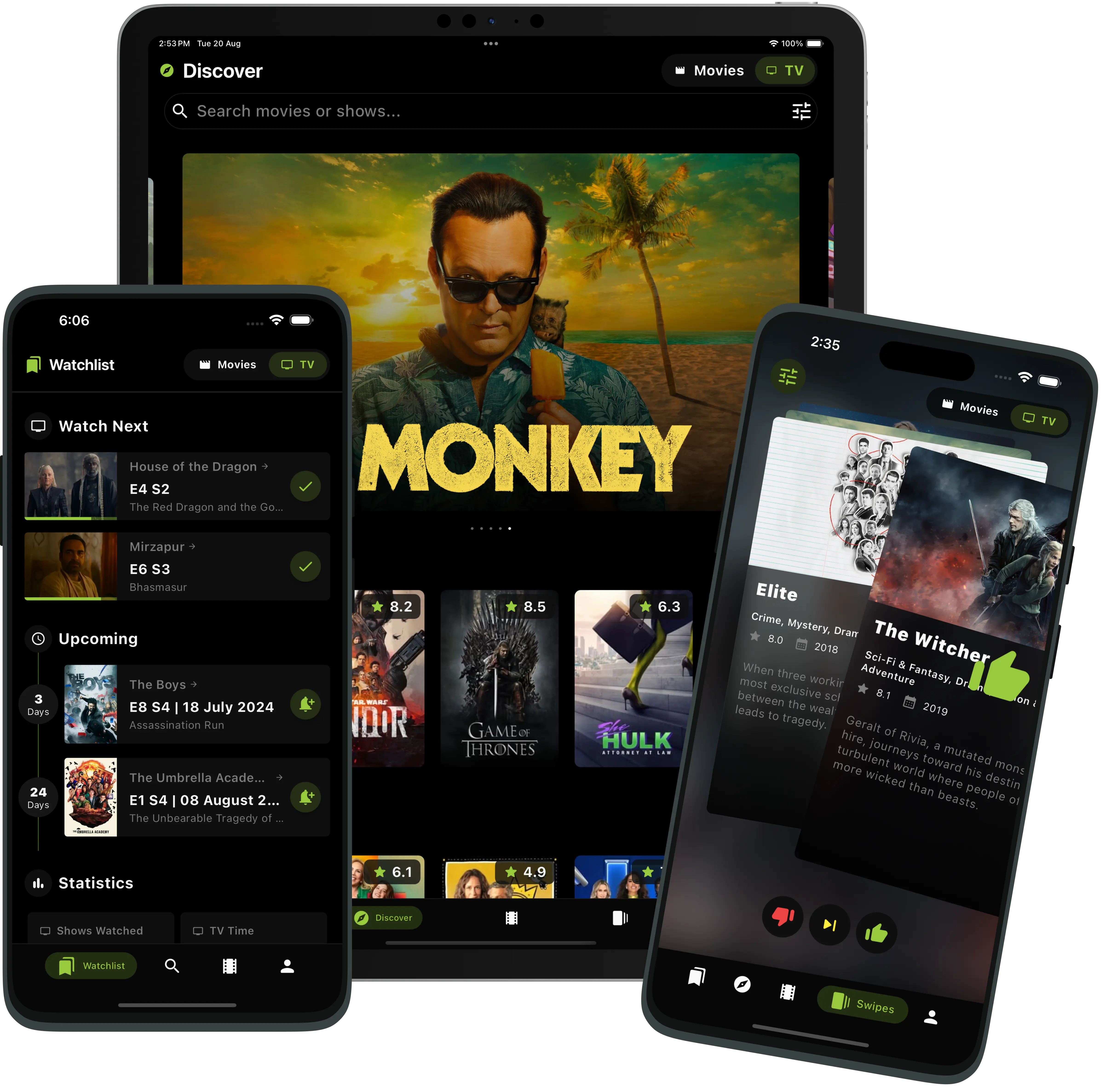
That is the whole thing. Two minutes in the app, then two hours in a film. It is the exact trade we built the app around.
Not a Cineswipe user? The structure still works anywhere: filter to your services, review one title at a time, use a clip or trailer instead of a blurb, and stop at three. The tool matters less than the discipline of narrowing, and that discipline is the real answer to how to search movies fast.
If you find yourself reaching for the same comfort show every night, that is normal, and we have written about why you keep rewatching The Office. A swipe session is a gentle way out of the loop.
How do you share your movie and show reviews with friends?
In Cineswipe, you rate a title, turn the review into a shareable poster with official artwork, and post it anywhere or send it to a friend. You can also share a public Cinelist or a profile link. Friends see your take on a polished card instead of a screenshot of a star rating.
Here is how it works.
- Log it and rate it. Mark a movie or show as watched and give it a rating. For series, rating a single episode is possible right when you mark it watched, which is handy for the bottle episode everyone argues about.
- Make the review poster. Cineswipe generates a poster from your rating and review. You pick a theme, choose a custom image and you can use the title's official logo instead of plain text. Episodes get their own rating poster too.
- Post it or send it. Share the poster to Instagram Stories, X, Threads or wherever your friends actually are. Titles, shows, people and lists also have share links with proper previews, so a link in a group chat shows a cinematic card instead of a bare URL.
- Add friends and send recommendations. Follow other cineheads (that is what Cineswipe calls its users), build a circle, and send titles to each other from inside the app.
- Share the whole shelf. A public Cinelist is a collection anyone can open, like and bookmark. Cineswipe calculates the dominant genres automatically and you can add your own tags, like "movies that feel like a fever dream." Send the link and your friend has a watch plan.
Write a review people actually read
Short beats long. One sentence on how it felt, one on who should watch it, and a rating. "Slow burn, gorgeous, watch it on a night with no phone" does more work than a plot summary. If you want to write longer reviews that also get found on Google, we have covered that in how to write a movie review that ranks.
How do you get your personal cinephile profile with Cineswipe?
You build it by using the app. Every film you swipe on, rate or mark as watched feeds a profile that shows your viewing stats, your top genres, an activity timeline and the titles you have pinned. You can share it as a link or keep it private. There is no quiz and no one-word label: Cineswipe shows you the data, and you decide what it says about you.
What your profile shows
- Viewing stats. Total movies, episodes and watch time at a glance, plus your top genres, your streaks and a year in review.
- Activity timeline. A running record of your watches, ratings, likes and library changes. Swipe between days and filter by movies or TV. It also appears on your public profile page, so friends can see what you have been into lately.
- Your taste, curated. Public Cinelists, bookmarked actors and creators, and a profile with custom avatars and backdrops pulled from your own collection.
- Pro touches. Pinned items, profile badges and an avatar ring.
- A shareable link. Profiles have deep links and web share pages with previews, so you can drop yours in a bio or a group chat.
- Privacy controls. There is a profile privacy toggle, so "public" is your choice.
How to fill it in fast
An empty profile says nothing. Three quick ways to give it substance:
- Import what you already have. Cineswipe syncs with Trakt, Simkl and TMDB, and Letterboxd or TV Time history can come across through Trakt. Your past ratings and watches show up on day one.
- Swipe for ten minutes. Likes and skips teach the app your taste and give your profile its first genre pattern.
- Rate as you watch. Ratings are the difference between a log and a profile. Rate the film while the credits are still rolling.
After a few weeks you will see things you did not know about yourself: that you watch far more thrillers than you admit, or that your highest-rated films all share a decade. That is the point of having a profile that grows with you.
FAQ
Answers to common questions related to this article
Decide your mood and runtime first, start from a film you already love, filter to the streaming services you pay for, and judge titles by a short clip instead of a synopsis. Stop at three candidates and save the rest to a watchlist.
Inside Cineswipe
Find your next watch, then keep it organized.
Swipe discovery
Likes and skips personalize recommendations over time.
Cinebot
Ask for a mood, genre, runtime, or movies like a favorite.
Watchlist & tracking
Track films and TV episodes, and import your watch history.
Sync & import
Import from Letterboxd, Trakt, Simkl, TV Time, and TMDB; sync with Trakt, Simkl, and TMDB.
Curate, review & share
Create public Cinelists and share polished review posters with your take.
Share this article: